
Applicable Products
| Part number | Description |
| ZETA-GEP-LTE4 (EU) | Low Power LTE Cat 4 European Modem with GPIO and GNSS |
| ZETA-G-GPRS | Entry Level GPRS Modem with GNSS (GL) |
| ZETA-N2-GPRS | Entry Level GPRS Modem (GL) |
| ZETA-NEP-LTE4 (EU) | Low Power LTE Cat 4 European Modem with GPIO |
| ZETA-NEP-LTEM (GL) | Low Power Global LTE Cat M Modem with GPIO |
| ZETA-NLP-LTE1 (EU) | Ultra Low Power European LTE Cat 1 Modem |
| ZETA-NLP-LTEM (GL) | Ultra Low Power Global LTE Cat M Modem |
| ZETA-N-LTE (EU) | High Performance LTE Cat 4 Modem with GPIO |
| ZETA-NSP-LTE1 (EU) | Low Power European LTE Cat 1 Modem |
Objective
To send AT commands (or communicate) to a modem using a PC, the modem’s COM ports must be set to enable communication between the two.
A modem’s COM ports can be set using a terminal emulator. There are a number of terminal emulators available including, PuTTY, Hyperterminal , RealTerm and TeraTerm. These programs are generally free to download.
Solution
This application note is intended to show how to set a modem’s COM port to communicate with a PC using Terminal Emulator Program of your choice.
List of Items:
A ZETA modem starter kit (includes power supply and RS232 cable for this application note)
Demonstration of Solution
- Turn On the modem and connect it to a PC using the supplied RS232 cable
- Open Hyperterminal (or your preferred terminal emulator)
- Select new connection
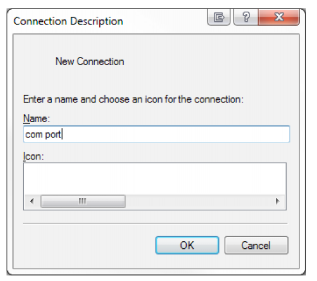
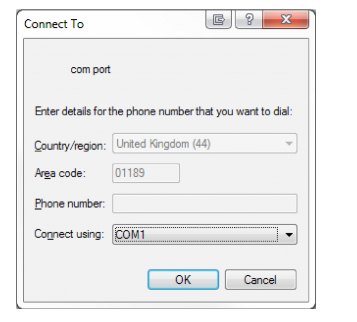
4. Choose the correct COM port
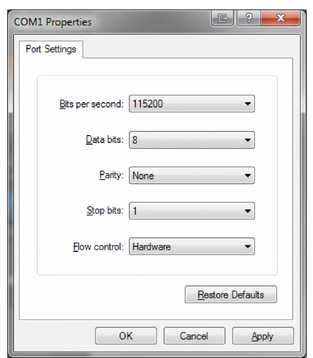
5. Configure the port with the following settings:
• Bits per second: 115200
• Data bits: 8
• Parity: None
• Stop bits: 1
• Flow control: Hardware
6. Send AT commands to the unit
| 1. Send AT commands to the unit
COM3 – Tera Term VT |
| File Edit Setup Control Window Help |
| AT
OK AT+GMR 12.00.213
OK |
The OK response shows that the PC is communicating with the modem.
Additional Reading
| Description | Author |
| ZETA Hardware user’s manual | Siretta |
| AT command manual | Telit |
| Quick Start Guide | Siretta |
| Realterm – https://sourceforge.net/projects/realterm/ | |
| PuTTY – https://www.puttygen.com/download-putty | |
